Screen spoofing is the easiest override in the business. There is one obvious number, screen.width, one obvious partner, screen.height, and every tutorial stops there. The trouble is that a browser reports roughly a dozen numbers about its own geometry, they are produced by different parts of the stack, and they are bound to each other by invariants that hold on every real machine and on no partially-spoofed one.
The strongest of those invariants needs no reference data at all: a window cannot be larger than the display it is on.
window.outerWidth  <= screen.availWidth
window.outerHeight <= screen.availHeight
Break that and there is nothing left to argue about. It is not a rare combination or a suspicious pattern, it is an impossibility, and the bigger of the two numbers is the real machine.
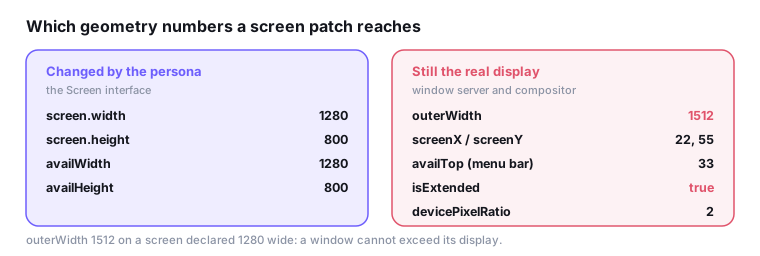
The failure, measured
Here is the shape it takes in the wild. A persona sets a 1280×800 screen. The browser is running on a 1512×982 laptop display, and nothing clamps the window when it opens:
screen.width      1280      <- persona
screen.availWidth 1280      <- persona
window.outerWidth 1512      <- the actual window on the actual display
The window is 232 CSS pixels wider than the screen it says it is on. A detector does not need to know anything about laptops to reject that.
The inverse case is more interesting because it happens to careful implementations. Take an Android persona with a 412×915 screen on a macOS host. macOS Chrome will not make a tabbed window narrower than about 500 CSS pixels: the toolbar and tab strip impose a minimum through the frame view. So the persona says 412 and the window will not go below 500, and the page reads:
screen.width   412
innerWidth     500
Viewport-Width: 500   (the client hint, sent on every request)
The viewport is wider than the screen. The identity layer was configured correctly and the window system simply refused. The fix is not in the fingerprint code at all: an app-mode window with no toolbar honours 412 exactly, at the price of having no toolbar. That trade is the actual decision, and no amount of JavaScript patching substitutes for it.
The numbers and where they come from
The reason these fall out of alignment so easily is that they are produced by four different layers:
| value | produced by |
|---|---|
screen.width / height |
display info the browser holds for the screen the window is on |
screen.availWidth / availHeight |
the same, minus OS furniture: taskbar, dock, menu bar |
screen.availLeft / availTop |
the origin of that available area |
outerWidth / outerHeight |
the browser window, from the window server |
innerWidth / innerHeight |
the viewport, after browser chrome and scrollbars |
screenX / screenY |
where the window sits in the virtual desktop |
devicePixelRatio |
the display’s scale factor |
screen.isExtended |
whether more than one display is attached |
A patch that intercepts the Screen interface changes the first three groups and nothing else. The rest keep describing the machine.
availTop deserves its own mention. On macOS the menu bar occupies the top of the available area, so availTop is a small positive number and availHeight is correspondingly less than height. Measured on the machine used throughout this post: screen 1512×982, availHeight 949, a 33-pixel difference that is the menu bar. On a typical Windows setup the taskbar is at the bottom instead, so availTop is 0 and availHeight is short by the taskbar. A persona claiming Windows with a 33-pixel gap at the top of its available area has described a Mac.
isExtended is a fact about the desk
screen.isExtended is a boolean that says whether the system has more than one display attached. It is a property of the hardware the browser is plugged into. On the machine used here it reads true, because there are two monitors on the desk, and it kept reading true under a persona that declared a single hard-coded 1280×800 screen.
For a desktop persona this is a moderate signal: multi-monitor setups are common, and a mismatch between “one screen declared” and “isExtended true” is odd but not impossible to argue away. For a mobile persona it is not moderate at all. Phones do not have extended displays. A browser presenting as a phone with isExtended === true has told you which of its two stories came from the window system.
The related tell is window.getScreenDetails, part of the Window Management API. Its presence is a desktop-build fact, covered in the interface census; its contents, if permission is granted, enumerate the actual displays.
Position, not just size
Size invariants are the loud ones. Position invariants are quieter and harder to satisfy by accident:
screenX >= availLeft
screenY >= availTop
screenX + outerWidth  <= availLeft + availWidth
screenY + outerHeight <= availTop + availHeight
On a single screen these hold. With multiple displays they legitimately do not, because a window on the second monitor has coordinates outside the primary screen’s box - which is exactly why isExtended has to be read before the position check is applied, and why a scanner that ignores it produces false positives on perfectly ordinary desks.
There is one more allowance worth building in: a maximized window on Windows overhangs the work area by a few pixels at some DPI settings, so a tolerance of a dozen or so pixels keeps a real maximized browser from being flagged. The failure mode this check exists to catch is measured in hundreds of pixels, not in ones.
Cross-checking dpr
devicePixelRatio binds the CSS-pixel world to the device-pixel world, and it participates in two relationships that are easy to break:
The first is with the media query. window.matchMedia('(resolution: 2dppx)') has to agree with devicePixelRatio === 2, and a resolution override applied to the property but not to the media query is a single-line detection. The same applies to (min-resolution:) bracketing and to (device-pixel-ratio:) in its WebKit-prefixed form.
The second is with the numbers above. screen.width * devicePixelRatio should be a physical resolution that a display actually ships with. A persona that sets 1280×800 with a dpr of 2 has claimed a 2560×1600 panel, which exists; one that sets 1366×768 with dpr 2 has claimed 2732×1536, which does not.
What to do about it
Two workable positions, and one that does not work.
Clamp the window into the persona’s screen. If the identity says 1280×800, the browser window has to open inside 1280×800 and stay there, including after the user drags it or the window manager restores a session. This is the option that keeps the persona intact, and it is a browser-process change rather than a JavaScript one, because the JavaScript-visible numbers are downstream of where windows actually get placed.
Or do not override the screen at all. Report the real display, and let identity come from dimensions that are not load-bearing for layout. The cost is that every profile on one machine shares a screen size, which is the linkability trade this whole field keeps running into.
What does not work is patching screen and leaving outerWidth, screenX, availTop and isExtended to the window system, because those four are how the check finds you. Geometry is not a set of independent numbers to be individually convincing. It is one coordinate system, and a page can walk all of it in about ten lines.