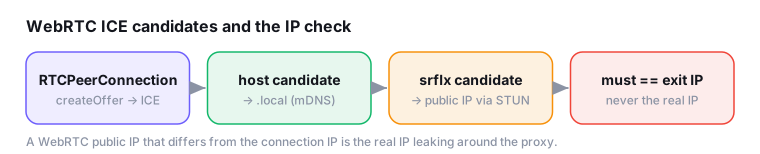
WebRTC is the oldest IP leak in the book, and it still works. You can route every HTTP request through a residential proxy, spoof your timezone, normalize your fonts. Then a single RTCPeerConnection gathers ICE candidates on a socket that never touched the proxy and reads your real public IP back into the page. The instinct is to block it. A subtler move works better. Make the IP WebRTC exposes agree with the IP your connection presents. A blocked WebRTC is fine. A WebRTC that leaks an IP different from your edge connection is a flare.
How the leak happens
WebRTC needs to find a path between two peers, so it runs ICE (Interactive Connectivity Establishment). ICE enumerates candidates, meaning every address the browser thinks it might be reachable on, and it does this eagerly, before any actual call. You don’t need a camera, a microphone or a remote peer. Creating a data channel and calling createOffer() is enough to kick off candidate gathering.
Three candidate types matter here:
- host: a local interface address (your LAN IP,
192.168.x.x/10.x.x.x, or historically the raw private address). - srflx (server-reflexive): your public IP as seen by a STUN server. This is the dangerous one for proxied setups.
- relay: a TURN-relayed address, rarely the leak vector.
The reason this bypasses a page-level proxy is architectural. The proxy is configured at the HTTP layer (or as a SOCKS proxy the browser honors for page traffic), but ICE opens its own UDP sockets to reach STUN servers. Unless the browser is explicitly told to confine or forbid non-proxied UDP, those sockets bind to the real interface, and the STUN reflection returns the real public IP, the one the proxy was supposed to hide.
Parsing candidates yourself
Here is the minimal probe. It mirrors what BrowserLeaks, Iphey and CreepJS run client-side: create a connection, add a data channel to force gathering, read candidate strings as they arrive.
async function gatherWebRtcIps({ stun = 'stun:stun.l.google.com:19302' } = {}) {
  const pc = new RTCPeerConnection({ iceServers: [{ urls: stun }] });
  const found = { host: new Set(), srflx: new Set(), mdns: false };

  // A data channel makes the connection "want" a transport,
  // which triggers ICE candidate gathering without media.
  pc.createDataChannel('probe');

  pc.onicecandidate = (e) => {
    if (!e.candidate) return;              // null candidate = gathering done
    const c = e.candidate.candidate;       // the raw SDP candidate line
    // candidate:842163049 1 udp 1677729535 <ADDR> 49923 typ srflx ...
    const parts = c.split(' ');
    const addr = parts[4];
    const type = parts[parts.indexOf('typ') + 1];

    if (/\.local$/i.test(addr)) { found.mdns = true; return; }  // mDNS host
    if (type === 'host')  found.host.add(addr);
    if (type === 'srflx') found.srflx.add(addr);                // public IP
  };

  const offer = await pc.createOffer();
  await pc.setLocalDescription(offer);
  await new Promise((r) => setTimeout(r, 2000)); // let candidates trickle in
  pc.close();
  return found;
}
A srflx line on a modern Chrome looks like this:
candidate:1853887674 1 udp 1677729535 203.0.113.42 51234 typ srflx raddr 0.0.0.0 rport 0 generation 0 ...203.0.113.42 is your public IP. If that address is your real one while your HTTP requests exit through a proxy, you have leaked around the proxy. A host candidate under mDNS instead looks like:
candidate:1853887674 1 udp 2113937151 f47ac10b-58cc-4372-a567-0e02b2c3d479.local 51234 typ host ...No raw LAN IP, just a random UUID hostname.
mDNS: what modern Chrome fixed and what it didn’t
Since Chrome 76, host candidates for the local interface are replaced with a randomized mDNS .local hostname, a per-origin UUID that resolves only on the local network via multicast DNS. This closes the LAN IP leak by default. A page can no longer read 192.168.1.37 out of a host candidate. It sees <uuid>.local and cannot resolve it to anything useful off-network.
mDNS is real mitigation. Its scope is narrow:
- It anonymizes host candidates only.
- It does nothing to
srflxcandidates. If STUN is reachable and IP-handling policy allows it, the public IP still comes through.
So “modern Chrome hides your LAN IP” is true, and “modern Chrome fixes WebRTC leaks” is not. The public-IP surface is governed by Chrome’s WebRTC IP-handling policy, not by mDNS:
| Policy | host candidates | Public IP (srflx) | Use |
|---|---|---|---|
default |
mDNS .local |
exposed via all interfaces | stock desktop |
default_public_interface_only |
mDNS .local |
only the default-route interface | reduces multi-homing leaks |
disable_non_proxied_udp |
suppressed unless proxied | only through the proxy path | the anti-detect setting |
| WebRTC disabled | none | none | acceptable, if consistent |
Anti-detect kernels force the proxied/limited mode (disable_non_proxied_udp), so that either UDP travels through the proxy and the reflected IP equals the proxy exit, or no public candidate is produced at all. Chrome’s own webRTCIPHandlingPolicy enterprise policy exposes the same knob.
The anti-detect failure mode
For a proxied profile there are exactly two acceptable WebRTC states:
- Fully disabled: no candidates, no IPs. Fine.
- Exposes only the proxy exit’s public IP: the
srflxaddress equals the IP the site’s edge sees on your HTTP connection. Fine.
Everything else is a tell. The specific catastrophe is a srflx IP that differs from your connection IP. The site now holds two IPs for one visitor: the proxy exit it saw at the HTTP layer, and the real address that leaked around it through UDP. No honest user produces that pair. It is a near-perfect proxy signal, and it hands the adversary your actual location for free.
Controlled testing across anti-detect browsers (same US residential proxy, headful, navigator.webdriver=false) shows the range of correct behavior:
| Browser | WebRTC behavior | Verdict |
|---|---|---|
| bablo | Public candidate = proxy exit IP | acceptable |
| VMLogin | Public candidate = proxy exit IP | acceptable |
| AdsPower | WebRTC disabled entirely | acceptable |
| CloakBrowser | No leak (nothing exposed) | acceptable |
All four are “correct” by different routes: two match the exit, one disables, one exposes nothing. None of them leaks a public IP that disagrees with the connection. That is the bar. A profile whose srflx IP is the real address behind the proxy fails regardless of how good the rest of the fingerprint is.
“A well-known browser that doesn’t lock down WebRTC leaks the real IP and gets the account flagged. Standing advice here is to just use a browser that actually closes the WebRTC leak.”
(a Reddit r/browsers first-hand comment)
That community read is correct, if incomplete. Closing the leak is table stakes. The leak that matters most is the mismatch, not the mere presence of an IP.
The cross-layer check
A client-side WebRTC probe alone is insufficient. Reading srflx in the page tells you an IP. It does not tell you whether that IP is the one the site will pin you on. The check has to be cross-layer: collect the WebRTC public IPs in the browser, then compare them against the connection IP the edge actually observed. Our scanner does exactly this. The webrtc-ip check:
// 11. WebRTC public IP vs connection IP
if (client.webrtc.publicIps.length) {
  if (server.ip && !client.webrtc.publicIps.includes(server.ip))
    add('webrtc-ip', 'WebRTC IP ↔ connection IP', 'warn',
      `WebRTC exposed public IP(s) ${client.webrtc.publicIps.join(', ')} that differ from your connection IP ${server.ip}.`, 10);
  else
    add('webrtc-ip', 'WebRTC IP ↔ connection IP', 'ok', 'WebRTC public IP matches the connection IP.', 0);
} else {
  add('webrtc-ip', 'WebRTC IP exposure', 'ok',
    client.webrtc.mdns ? 'Only mDNS (.local) candidates - no real IP leaked.' : 'No public IP leaked via WebRTC.', 0);
}
The logic collapses to three outcomes:
- A public candidate that is not the connection IP → warn (real IP leaking around the proxy).
- Only mDNS
.localcandidates → OK (host anonymized, no public leak). - No public candidate at all → OK (disabled or fully proxied).
The server.ip term is the load-bearing part. It is the IP the edge saw, not an IP the page reported, so a spoofed client-side answer cannot fake agreement. This is the same shape as every other consistency check worth running: never trust one layer’s self-report, and cross it against a layer the profile can’t easily forge.
A device-count aside
While you have mediaDevices open, note that enumerateDevices() leaks the count and labels of audio/video devices, another consistency surface. A persona with zero media devices looks more synthetic than a real consumer machine, which usually has at least a webcam and a couple of audio endpoints. Among the tested browsers, AdsPower included a webcam in its device list, which reads as more human than an empty enumeration. It is a smaller signal than the IP mismatch, but it lives on the same subsystem and belongs in the same audit.
The honest caveat
WebRTC leaks matter most in one specific topology: a proxy set at the HTTP/browser layer while WebRTC’s UDP sockets bypass it. That is the anti-detect-browser default, and it is where the danger concentrates.
A system-level VPN or transparent proxy that captures all UDP does not leak the same way. If every packet including STUN traffic exits through the tunnel, the reflected srflx IP is the tunnel exit, and it agrees with your connection by construction. In that setup WebRTC is not the hole it is for a page-level proxy. Don’t apply page-proxy paranoia to a full-tunnel configuration. The threat model is different. The check still runs the same way, comparing exposed IP to connection IP. It just tends to pass for free.
The other honest hedge: this is a 2026-07 snapshot. mDNS behavior, the default IP-handling policy and STUN reachability all shift between Chrome releases and between managed-policy environments. Re-probe after every kernel or Chrome version bump rather than trusting a result from three versions ago.
Takeaway
Blocking WebRTC is a valid answer, but a blunt one. The real requirement for a proxied profile is agreement: WebRTC must expose nothing, or expose only the proxy exit’s public IP, never a public IP that disagrees with the connection the edge sees. mDNS handles the LAN-IP half by default. The srflx half is yours to close with IP-handling policy and to verify with a cross-layer check. Probe it against your actual connection IP, not against what the page claims, and re-run it whenever the browser updates.