
WebAuthn has two static methods that answer questions about the user’s hardware and browser, take no arguments, show no prompt, and require no permission:
await PublicKeyCredential.isUserVerifyingPlatformAuthenticatorAvailable();  // true
await PublicKeyCredential.isConditionalMediationAvailable();                // true
The first one means: there is an authenticator built into this device that can verify the user. Touch ID or the Secure Enclave on a Mac. Windows Hello, with a fingerprint reader, a camera or at least a PIN enrolled. A screen lock on an Android phone. It is a statement about physical hardware and its configuration, and it is a boolean that a login page reads to decide whether to offer passkeys.
It is also a boolean nobody puts in an identity model, which makes it one more thing a persona inherits from whatever machine it is really running on.
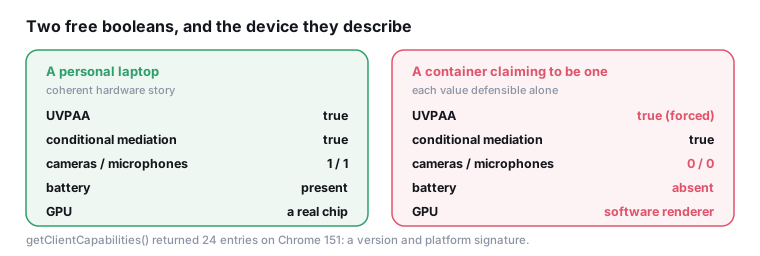
What the boolean implies about the claim
isUserVerifyingPlatformAuthenticatorAvailable returning true is a claim that this device has a working, enrolled biometric or PIN-backed authenticator. Line that up against what a persona typically asserts:
| the persona says | UVPAA should be | when it is not |
|---|---|---|
| a MacBook | true on any modern Mac with Touch ID enrolled |
false says no enrolment, plausible but less common |
| a Windows desktop | true if Windows Hello is set up |
many desktops without a camera or reader report false |
| an Android phone | true on any device with a screen lock |
false on a phone is unusual |
| a Linux server, or a container | false |
true is close to impossible |
The last row is the one that bites automation. A headless browser in a container has no platform authenticator and reports false. A browser presenting as a personal Android phone while reporting false has contradicted the story that this is somebody’s daily device.
The reverse also happens, and it is louder. A browser reporting true while presenting as a plain desktop that also reports no camera and no microphone through mediaDevices, no battery, and a datacentre exit address has assembled a device that does not exist.
The capability map
Newer Chrome adds a third static method, and it does not return one boolean. It returns about two dozen:
await PublicKeyCredential.getClientCapabilities();Measured on Chrome 151, macOS, the result had 24 entries. The shape:
| entry | value |
|---|---|
userVerifyingPlatformAuthenticator |
true |
passkeyPlatformAuthenticator |
true |
hybridTransport |
true |
conditionalCreate / conditionalGet |
true / true |
relatedOrigins |
true |
immediateGet |
true |
signalAllAcceptedCredentials |
true |
extension:prf |
true |
extension:largeBlob |
true |
extension:credBlob |
true |
extension:hmacCreateSecret |
true |
extension:payment |
true |
extension:minPinLength |
true |
extension:cmtgKey |
false |
extension:crossDeviceFallbackUrl |
false |
Twenty-four booleans, of which two are false on this build. That combination is a version signature: the extension list grows as the specification does, and the two false entries are features this Chrome knows the names of and has not shipped. A browser claiming a version whose capability map does not match that version’s map has said something checkable.
It is also a platform signature. hybridTransport describes cross-device passkey flows over Bluetooth. userVerifyingPlatformAuthenticator echoes the boolean above. A capability map is a compact description of what this browser on this device can actually do with credentials, and a persona that has never heard of the method returns whatever the host returns.
Virtual authenticators
The obvious way to make UVPAA report true on a machine that has no authenticator is the debugging protocol’s WebAuthn domain, which adds a virtual authenticator to the browser. It works, and automation frameworks use it routinely for testing passkey flows.
It brings its own signals. Two are structural.
A real platform authenticator involves a human: a fingerprint, a face, a PIN. That takes time, and the time is variable. A virtual authenticator responds immediately and consistently, so the interval between the credential request and its resolution is short and has almost no variance. A site that measures how long its own passkey ceremony took is reading user interaction latency.
The second is that attestation carries an identifier for the authenticator model, and a virtual one carries the value its implementation was given. A relying party that keeps a table of known authenticator identifiers sees a value that is either a known test identifier or not a real device.
Neither of these matters unless the site actually runs a credential ceremony. The free booleans are read far more often than a ceremony is performed, which is why they are the interesting part of this surface for ordinary fingerprinting.
The account-linkage angle
There is a second reason to care about this surface, and it is not fingerprinting at all.
A passkey is a durable, per-origin credential that lives in the profile. If profiles are shared, cloned, or synchronised across machines, credentials go with them. Two accounts that present a credential derived from the same authenticator are related in a way that no fingerprint-level separation undoes, because the relationship is cryptographic rather than statistical.
The operational rule follows directly: a profile’s credential store belongs to that profile and does not get copied. Cloning a profile as a template is a normal thing to do and a bad thing to do once credentials are in it.
Consistency with the rest of the hardware story
The reason this surface is worth more than its individual booleans is that it participates in the hardware coherence question from an angle nothing else covers.
A platform authenticator implies specific hardware: a secure element, and usually a biometric sensor. That sits alongside what the other APIs say about the same device. mediaDevices.enumerateDevices reports how many cameras and microphones exist, without labels and without a permission prompt. The Battery Status API, where available, reports whether there is a battery at all. Core count and memory describe the machine class. The GPU string names the chip.
Assemble those and the device either exists or it does not:
| signal | a personal laptop | a datacentre container |
|---|---|---|
| UVPAA | true | false |
| cameras | at least one | zero |
| microphones | at least one | zero |
| battery | present, discharging sometimes | absent or permanently full |
| GPU | a real chip | software renderer |
A browser that reports a platform authenticator, zero cameras, zero microphones, no battery and a software renderer has claimed a machine with a fingerprint reader and no other hardware. The individual values are each defensible. The combination is not a device.
This is also why fixing UVPAA alone tends to make things worse rather than better. Forcing it to true on a container removes one inconsistency and creates a sharper one, because it moves the profile from “clearly a server” to “a device that cannot exist”.
What a scanner should read
Cheap, in one pass, with no prompts:
isUserVerifyingPlatformAuthenticatorAvailable, cross-checked against the claimed device class and against the other hardware signals - camera and microphone counts, battery presence, core count.isConditionalMediationAvailable, which should track UVPAA on a device with a platform authenticator and version-gate on older builds.getClientCapabilitieswhere present, as a version and platform signature, and as a presence signal on builds that predate it.- Whether
PublicKeyCredentialexists at all, which is a secure-context and platform question that belongs with the interface census.
The theme is the one this site keeps returning to. WebAuthn was designed to describe the user’s hardware honestly, because a login page needs to know whether to offer a passkey. Honesty about hardware is exactly what a persona cannot afford, and the API was never asked whether it wanted to participate.