Almost everything a browser says about itself is a value it was told to report. The User-Agent is a string. navigator.platform is a string. Client hints are strings the network stack assembles from a struct. Screen dimensions, GPU names, timezone, language: all values, all settable, all the things an anti-detect kernel exists to set.
Then there is a different kind of question, and it has nothing to do with values:
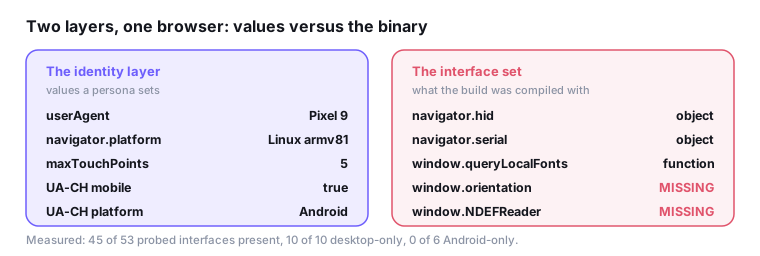
typeof navigator.hid; // "object" on desktop Chrome. Not present on Android.That is not a value the browser reports. It is a fact about which code was compiled into the binary and which features its configuration turned on. Chromium keeps per-platform feature status in runtime_enabled_features.json5, and the entries carrying an explicit status: {"Android": …} are precisely the set where the two platforms genuinely differ by default. A desktop build and an Android build of the same Chrome version expose measurably different interface sets, and no amount of identity spoofing moves a single entry.
What the census looks like
Fifty-three probed paths on a stock Chrome 151, macOS, over https:
| count | |
|---|---|
| interfaces present | 45 / 53 |
| desktop-only interfaces present | 10 / 10 |
| Android-only interfaces present | 0 / 6 |
The ten desktop-only entries are navigator.hid, navigator.serial, navigator.keyboard, window.queryLocalFonts, window.documentPictureInPicture, window.EyeDropper, window.showOpenFilePicker, window.getScreenDetails, navigator.mediaDevices.getDisplayMedia and HTMLMediaElement.prototype.setSinkId. WebHID and Web Serial are desktop-only by design. Local Font Access, Document Picture-in-Picture, the EyeDropper, the File System Access pickers and Window Management are desktop features that were never shipped to phones. Screen capture and audio output device selection likewise.
The six Android-only entries are window.orientation, window.onorientationchange, window.ontouchstart, window.NDEFReader, navigator.contacts and navigator.connection.type. Web NFC ships on Android and nowhere else. The Contact Picker is Android-only. window.orientation is a deprecated legacy property that desktop Chrome never had and Android Chrome still carries. connection.type is exposed on Android and absent from desktop builds, where navigator.connection stops at effectiveType, rtt and downlink.
Now take a desktop browser, rewrite its identity layer to a Pixel 9 exactly as a persona would - User-Agent, platform, maxTouchPoints, the whole UA-CH struct - and leave everything the host actually produces alone. Run the census again. Ten desktop-only interfaces still present, zero Android-only interfaces present. Nothing changed, because nothing about the census was ever part of the identity layer.
The mistake this replaces
The folklore version of this check is navigator.vibrate: no vibration motor, no vibrate, therefore a browser with vibrate is a phone. It is wrong. Desktop Chrome ships navigator.vibrate as a function; it simply does nothing. Measured on the same macOS Chrome 151 as everything above, typeof navigator.vibrate === 'function'.
That failure mode is worth dwelling on, because it is the general one. “Feature X is a mobile feature” is an intuition about hardware. “Feature X is guarded by status: {"Android": "stable"} in the feature table” is a fact about a build. Only the second survives contact with a real browser, and the two disagree more often than you would guess. Half the plausible mobile-sounding APIs - DeviceMotionEvent, DeviceOrientationEvent, TouchEvent, navigator.share, navigator.wakeLock, setAppBadge - are present on desktop Chrome and useless as form-factor signals.
Build the list from the feature table, not from what sounds like a phone.
The trap: secure context
The first time this census ran it reported 12 of 53 interfaces present on a desktop browser, missing navigator.hid, navigator.keyboard, getScreenDetails and deviceMemory alike. The build had not changed. The page had: the probes were running on about:blank, which is not a secure context, and most of these interfaces are secure-context gated.
This matters more for detection than it looks. Over http, every build looks equally bare, so a mobile persona passes the “has desktop interfaces it should not” test for free, while a genuine Android browser fails the “has the Android interfaces it should” test for the same reason. One direction produces false negatives and the other false positives, from the same cause.
The census is only judgeable on https. Any implementation of this idea has to read window.isSecureContext first and refuse to score otherwise, which is what @liarjs/checks now does: on a non-secure origin the check reports the counts and explicitly declines to judge them.
The Notification tell
One entry is not a presence question at all. Android’s Chrome builds ship the Notification interface but not its constructor: new Notification('x') throws TypeError: Illegal constructor. Use ServiceWorkerRegistration.showNotification() instead. Desktop constructs it fine.
So typeof Notification is the same on both, and the constructor is not. This is the shape of the strongest fingerprinting checks generally: not “does the name exist” but “what happens when you use it”. A build cannot fake the second without patching the engine, and patching the engine to fix it is a different and much larger project than editing a User-Agent.
The probe has to be careful about side effects. With permission already granted, constructing a Notification can display one, which is not a thing a fingerprint probe should do to a user. The rule is simple: read Notification.permission first, and only construct when it is not granted. In every other state the constructor either works silently or throws, which is exactly the bit of information wanted.
What it costs to fake
Suppose you decide to fix this. The paths are not equal.
Roughly forty of the platform differences are [RuntimeEnabled] features, which means they respond to --enable-blink-features and --disable-blink-features on the command line, applied after all defaults. Turning off the desktop-only ones and turning on OrientationEvent, ContactsManager, WebNFC and NetInfoDownlinkMax is genuinely a command-line exercise.
The rest are not. navigator.keyboard, window.getScreenDetails, navigator.windowControlsOverlay, navigator.virtualKeyboard and navigator.ink have no [RuntimeEnabled] extended attribute in their IDL, so they exist unconditionally in a build that compiled them. Removing those means patching and rebuilding.
And there is a trap on the far side of the work: the honest answer for some of these is “present on Android too, it just fails when called”. Deleting an interface that a real phone has, because it sounded desktop-shaped, creates a new lie rather than removing one. The only way to settle the ambiguous entries is to run the census on a real device and diff. That is also why the list a detector should score on is the conservative subset: entries where the desktop-only or Android-only status is a documented platform decision, not the full census.
There is a second-order trap too. The surface differs by host OS as well as form factor - BarcodeDetector, for instance, is on by default on macOS and Android and off on Windows and Linux. Normalize an Android persona to one candidate list and it will present a different interface set depending on which desktop it happens to be running on. Which is, itself, a fingerprint.
Where it sits among the other checks
Run the whole battery against a desktop host wearing an Android persona and the census is not alone:
| check | −pts |
|---|---|
api-formfactor (10 desktop-only interfaces on a mobile claim) |
22 |
font-metrics (0% of Android’s signature families have real metrics) |
20 |
api-mobile-missing (none of Android’s own interfaces present) |
14 |
api-notification (new Notification() succeeded) |
10 |
screen-extended (isExtended true on a phone) |
10 |
touch-pointer (maxTouchPoints=5, any-pointer: coarse false) |
8 |
Score: 16 out of 100.
That list is the argument. The identity layer was rewritten perfectly - the User-Agent, the platform string, the touch count and every client hint say Pixel 9, and no check reads them and objects. Every one of these findings comes from a layer the persona does not reach: which fonts have files, which interfaces were compiled in, what the window system reports, what the constructor does. Fingerprinting stopped being about what a browser claims a while ago. It is about what a browser is unable to stop being.